
Managing your product catalog is a normal part of running an online store. Whether a product is discontinued, no longer relevant to your audience, or simply something you don’t want to sell anymore, you should always feel confident making changes — without worrying that your data feed will undo your work.
If you’re using Win-Cart with Win-Feed on Shopify, here’s exactly how product removal works, what the data feed will (and won’t) overwrite, and how to handle image-related questions.
Yes — absolutely.
You are free to delete any product from your Shopify catalog at any time. Removing a product will not cause issues with your Win-Feed data sync.
Log in to your Shopify Admin
Use the search bar to find the product you want to remove
Open the Product Details page
In the top-right corner, click More actions
Select Delete product
Confirm the pop-up
Once completed, the product is removed from your store.
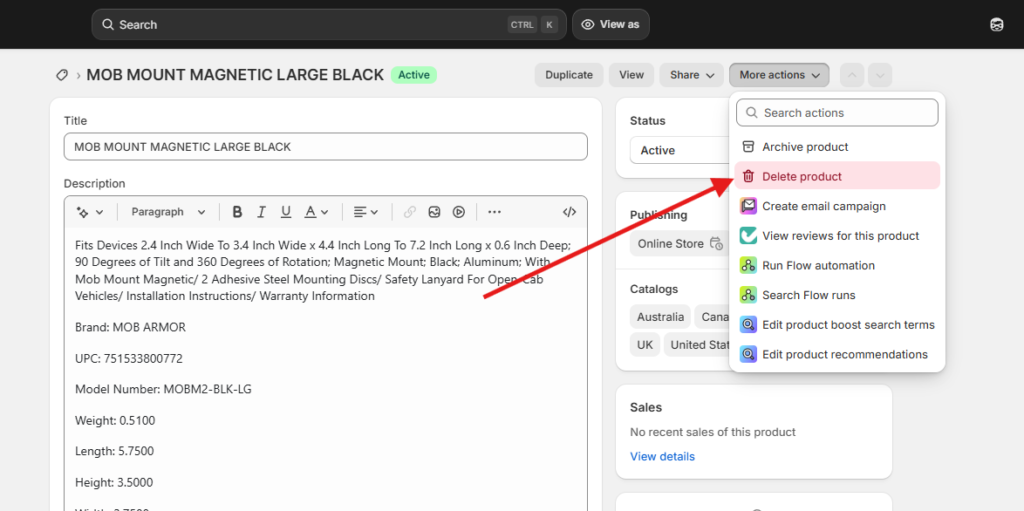
This is one of the most common concerns — and the answer is reassuring:
No. Deleted products will not be re-added by Win-Feed.
Win-Feed is designed to respect merchant-level decisions. If you remove a product, change its description, add images, or adjust pricing, those changes stay in place.
Win-Feed respects all of the following changes made directly in Shopify:
Product deletions
Product title or description edits
Image additions or removals
Pricing changes
Product status changes
Once a product is removed, it stays removed unless you intentionally add it back.
There is one specific field that the data feed is designed to keep updated:
Inventory quantity
If the supplier updates stock levels, Win-Feed will overwrite inventory quantities to reflect real-time availability. This is intentional and ensures:
Accurate stock levels
Fewer backorders
Better customer experience
Other than inventory quantity, your changes are always respected.